5 min read
The official WhatsApp API inside your system: a shared inbox and follow-ups that stop on their own
How I integrated the official WhatsApp API into a real estate agency's CRM: an inbox for the whole team, Meta templates and follow-ups that stop on their own.
WhatsAppIntegrationsAutomation
If you serve customers on WhatsApp, you know the scene. A phone that gets passed from hand to hand, or one number per salesperson. A customer writes on Tuesday, someone answers on Thursday from another phone, and by Friday nobody knows what they were promised. When a salesperson leaves, their conversations leave with them.
The problem isn’t WhatsApp. It’s that the conversations live outside the system where the rest of the business is. I solved it in CRM Lexinton, the system of a real estate agency in Buenos Aires that its team of 10 users runs in production. Here’s how it turned out and which decisions make it work.
One inbox for the whole team
The system connects natively to the WhatsApp Cloud API, Meta’s official API. There’s no middleman and no monthly license per agent: the agency paid for the development once.
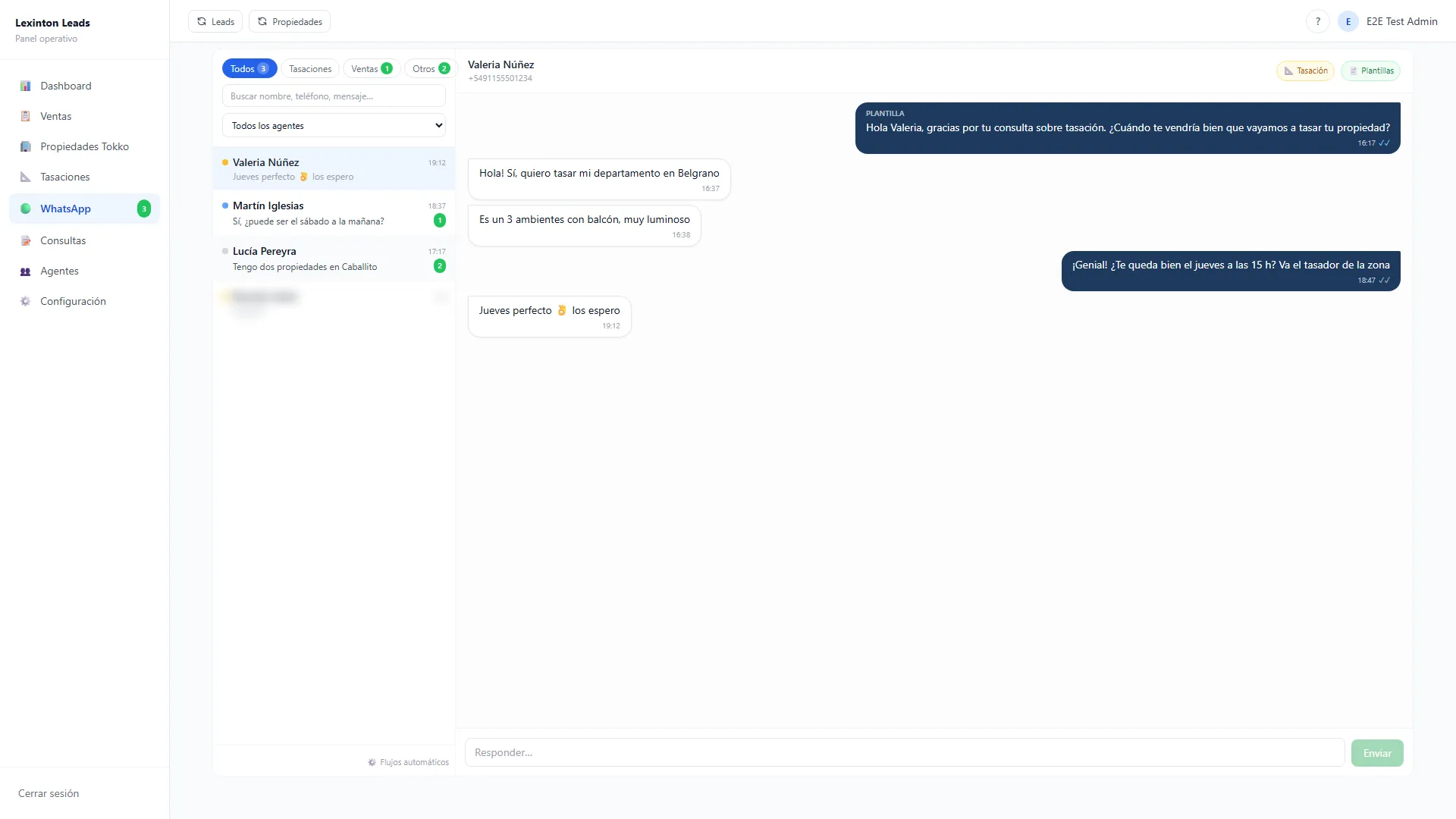
Inside the system there’s an inbox that looks like WhatsApp Web, with what a team needs:
- Tabs by context: All, Valuations, Sales and Other, each with its unread counter, updated live.
- Role-based permissions: each agent sees their own conversations.
- Search, to find a thread without scrolling.
- An unknown number becomes an inquiry or a valuation with one click. Someone writing for the first time doesn’t get lost in the chat: they become a business record.
Permissions don’t depend on the screen. Every request to the inbox checks, on the server side, which conversations that user can see. If tomorrow someone builds a new screen and forgets to filter, the agent still can’t see what isn’t theirs.
Every conversation, attached to the client’s record
The big difference from a shared phone is this: the chat isn’t an island. Every conversation is linked to the client’s record, together with their inquiry, its statuses and their viewings. Whoever opens the record sees the full history without asking anyone.
Making that work meant solving a very Argentine detail. Meta sends the 9 in mobile numbers inconsistently: the same client can arrive with it or without it. If you compare the numbers as they are, the same person shows up twice. The system stores a computed column with the last 8 digits and compares on that.
The files clients send (photos, documents) aren’t copied into the database: they’re downloaded from Meta when someone opens them. The database stays light.
The 24-hour window, handled in the composer
Meta has a rule that surprises many owners: if the client hasn’t written to you in the last 24 hours, you can’t send them a free-form message. You can only use templates Meta approved beforehand.
The client writes
Free-form message
The team replies like in any chat.
24 hours pass with no message from them
Approved templates only
The composer offers the agency's 9 templates, with a preview.
The system’s composer detects which side of the window each conversation is on. If it’s open, you write normally. If it has closed, it offers the agency’s 9 approved templates, read live from Meta’s API. It fills in the parameters with the contact’s data and shows a preview before sending. The actual text that went out is saved in the thread, so anyone reading it later knows exactly what the client received.
Reading them live has a practical advantage: the composer’s list is always the one Meta has approved. If the agency adds a template, it shows up on its own.
Automated follow-ups with a golden rule
Follow-up is where the most gets lost: the inquiry nobody wrote back to. That’s why the system has its own automation engine, triggered by business events:
- A valuation request came in.
- The valuation was completed.
- A viewing was booked, with a reminder 2 hours before.
Each event schedules its messages with configurable delays. Sends only go out between 8 AM and 7 PM, so nobody gets a WhatsApp from the agency at midnight. There are 7 flows, and each one is set up and switched on or off from the system, with a master switch as well. Without touching code.
And the golden rule, which we defined with the owner: when the client replies, the automation goes quiet and a person takes over. The chain of pending messages cancels itself. A client who asks something specific shouldn’t get a generic reminder half an hour later.
- 01A valuation request comes inSystemOr changes status, or a viewing is booked.
- 02Schedules the flow's messagesSystemWith configurable delays. Each message is a row in PostgreSQL that can be seen and canceled.
- 03Sends only between 8 AM and 7 PMSystem
- 04The client repliesPerson
- 05Cancels the pending messagesSystem
- 06Someone on the team takes overPersonWith the full history in the client's record.
On the technical side: the queue is explicit and lives in PostgreSQL. Each scheduled message is a row with its send time and its status, so it can be seen, audited and canceled. The backend is TypeScript end to end, and the messaging engine is covered by unit tests, part of the project’s 100.
What you don’t see: the signature and a shared account
Meta notifies the system of every new message by calling a public address, known as a webhook. Public means anyone could send a fake message there. That’s why every notice arrives signed with HMAC-SHA256: a fingerprint calculated with a secret key that only Meta and the system know. The system recalculates that fingerprint and, if it doesn’t match, discards the notice. If the key isn’t configured, it rejects everything: a public endpoint trusts nothing by default.
Delivery statuses (sent, delivered, read, failed) arrive through the same channel, and each notice is routed to the right account according to the number that received it.
There was one moment worth telling. With everything configured and verified, Meta wasn’t delivering any messages. Our side was fine, so I went to the WhatsApp Business account settings: it was subscribed only to the Make app the client already used. I subscribed our app too, through the Graph API. Today the two coexist, and what the client had running kept running.
Where to start
A simple test: pick three customers who wrote to you last week and try to reconstruct what your team told them, and who. If you have to borrow a phone to do it, your conversations live in the wrong place. Bringing them into the system, attached to each customer’s record, puts everything else in order.
If you want to bring order to your business’s WhatsApp, get in touch and we’ll take a look.
Frequently asked questions
What is the official WhatsApp API?
It's Meta's WhatsApp Cloud API: the official way for a system to send and receive WhatsApp Business messages without a phone in the middle. Incoming messages reach the system through a webhook, outgoing ones are sent through the API, and each send reports its status: sent, delivered, read or failed. With that, conversations live inside the business's system.
How much does the official WhatsApp API cost?
Meta charges per message according to its own rate table, which depends on the country and the type of message, and it's worth checking the current one because it gets updated. The business pays that cost directly to Meta. The development of the integration is separate: in CRM Lexinton it was paid once, with no monthly license per agent.
What is WhatsApp's 24-hour window?
It's Meta's rule that, when a customer writes to you, you have 24 hours to reply with free-form messages. Once that period passes without them writing again, you can only contact them with templates approved by Meta. In a well-integrated system, the composer detects which side of the window each conversation is on and offers the right option, without anyone having to count hours.
What is a WhatsApp Business template?
It's a message with fixed text and variable fields, such as the customer's name or a date, that Meta reviews and approves before it can be used. Templates are the way to start or resume a conversation outside the 24-hour window. If the system reads them live from Meta, as CRM Lexinton does with its 9 templates, every newly approved template becomes available without touching code.
Can several people handle the same WhatsApp number?
Yes. With the official API, the number no longer depends on a phone, and the whole team works from a shared inbox inside the system, with role-based permissions. Each salesperson sees their conversations, the owner sees the full history, and when someone leaves the company, their chats stay with the business.
Is it safe to connect WhatsApp with a QR code or an unofficial app?
Tools that mimic a phone and connect by scanning a QR code do work, but Meta can block the number at any time, and the business bears that risk. For a number your customers depend on, the safe route is Meta's official API. It's the one I use in client projects.
How do you automate WhatsApp follow-ups without bothering customers?
With three rules: each message is triggered by a real business event, it goes out at a reasonable hour, and the sequence stops as soon as the customer replies. In CRM Lexinton, automated sends go out between 8 AM and 7 PM, and when the customer replies, the pending messages are canceled and a person takes over. That way the follow-up stays helpful without sounding robotic.
How do you integrate WhatsApp with a CRM?
You connect Meta's official API to the system: messages come in through a webhook, are saved in the thread and are linked to the customer's record by their phone number. In Argentina there's a key detail: Meta sometimes sends the 9 in mobile numbers and sometimes doesn't, so it's best to compare by the last 8 digits to avoid duplicate contacts. With the conversation attached to the record, anyone on the team sees the full history.
What is a WhatsApp webhook and how is it protected?
It's the address of your system that Meta notifies about every new message and every status change. Since it's public, anyone could try to send a fake notice there, so every legitimate notice arrives signed with HMAC-SHA256 and the system verifies the signature before accepting it. If the signature doesn't match, or the key to verify it is missing, the notice is discarded.
Can I integrate WhatsApp into my system if I already have other automations connected?
Yes, they can coexist. A WhatsApp Business account can have more than one subscribed app, and each one receives Meta's notices. In CRM Lexinton I added the system's app next to the one the client already used, and everything that was working kept working.